



Executive Summary
The BitUnix app is a mobile crypto trading platform (iOS/Android) serving over 3 million users. It offers spot and perpetual futures trading across 1000+ coin pairs with advanced charting and up to 200× leverage.
- Executive Summary
- What Is the BitUnix App?
- Key Features and Security of the BitUnix App
- Comparative Feature Table: BitUnix vs. Competitors
- How to Download and Install the BitUnix App
- Setting Up Your BitUnix Account and KYC
- Depositing Funds and Trading on the App
- Security Best Practices
- Risks and Criticisms of the BitUnix App
- Conclusion and Takeaway
- What is the Bitunix app?
- Is the Bitunix app safe to use?
- How do I download the Bitunix app?
- Does the Bitunix app support leverage trading?
- What fees does the Bitunix app charge?
- Disclaimer
It emphasises strong security and trust: assets are held 1:1 via Proof of Reserves, with cold/hot wallet separation and partnerships (Fireblocks) plus insurance ($50M) and a $200M protection fund. BitUnix also holds U.S./Canada MSB licenses.
We compare BitUnix to leading exchange apps (Coinbase, Binance, Bybit) in terms of features, fees, KYC and custody. We provide a step-by-step guide: downloading the official app, registering, completing KYC, depositing funds, and making trades.
We analyse risks and criticisms: regulatory status (US/CAN restrictions despite licenses), limited fiat on-ramps, mixed user reviews (mobile app performance and account blocks reported), and typical exchange risks (private keys, high leverage).
The conclusion offers a strategic takeaway: BitUnix’s app is powerful for advanced traders, but users should weigh its perks against regulatory and usability trade-offs.
What Is the BitUnix App?
The BitUnix app is the official mobile client for the BitUnix cryptocurrency exchange, allowing users to trade Bitcoin, Ethereum, and a wide range of altcoins on spot markets and perpetual futures markets. The app is designed for both beginners and experienced traders.
It provides “hundreds of trading coin pairs in spot and futures markets”, deep liquidity, and advanced TradingView-powered charts for real-time analysis. Notably, BitUnix supports up to 200× leverage on futures contracts, placing it among the higher-leverage platforms (see Features below).
Key marketing points highlight that over 3 million traders use BitUnix. The app integrates spot trading, futures trading, copy-trading, and “Earn” products (staking and lending) into one platform.
According to official descriptions, the app is “secure, licensed, and transparent”: it holds MSB licenses in the U.S. and Canada, backs all user funds 1:1 via Proof of Reserves, and employs industry best-practices to protect assets. BitUnix also emphasises ease of use: one-tap deposits (Apple Pay, Google Pay, credit cards) and 24/7 multilingual support.
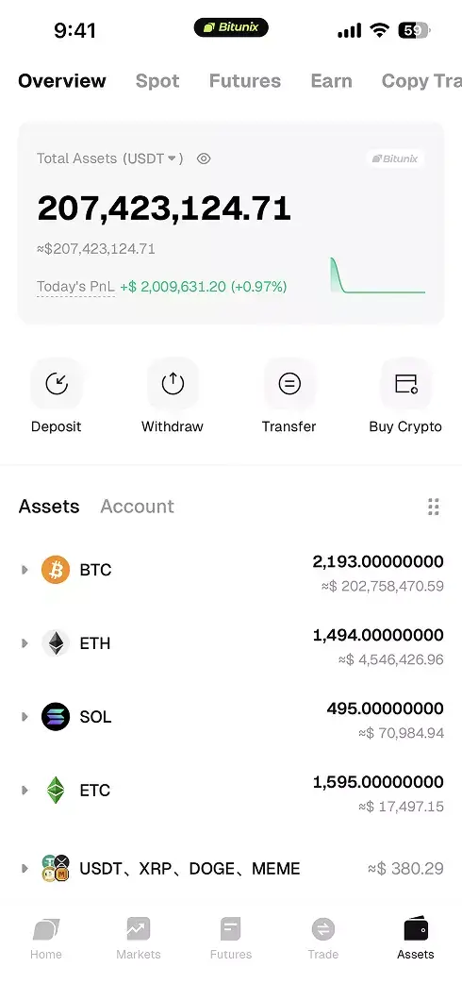
Figure: The BitUnix mobile app supports spot and futures trading on 1000+ crypto pairs with up to 200× leverage. It targets both new and advanced traders with a full suite of trading tools. (Example interface shown below)
Key Features and Security of the BitUnix App
The BitUnix app packs a rich feature set for mobile crypto trading:
- Spot & Futures Trading: Users can trade on spot markets and open perpetual futures positions. BitUnix supports hundreds of coin pairs (700+ spot and 400+ USDT futures), with order types including market, limit, stop-loss, and take-profit. All major crypto assets (BTC, ETH, SOL, etc.) are available. High liquidity and professional charts allow tight spreads and fast execution.
- High Leverage: Futures contracts offer up to 200× leverage, although typical users use more moderate leverage. This appeals to experienced traders seeking large directional exposure. Hedge mode is also supported (simultaneous long/short on one market).
- Earn and Promotions: Beyond trading, the app has “Earn” products (flexible/fixed staking) and frequent promotional campaigns (deposit bonuses, trading competitions). Active reward events and an academy/tournament system aim to increase engagement.
- Copy Trading: BitUnix includes a built-in copy-trading feature. Users can follow top traders and automatically replicate their trades, with transparent stats (ROI, win rate). Risk settings (allocation, stop-loss) can be configured for each copied trader.
Security and trust are core selling points:
- Proof of Reserves: BitUnix publishes a 1:1 reserve ratio for all user funds. Users can cryptographically verify that the exchange holds at least as many assets as it owes customers. This is designed to build confidence that user crypto balances are fully backed.
- Insurance and Funds: According to the app descriptions, BitUnix maintains an “emergency insurance reserve of $200M” to protect user funds from exchange-origin losses. The official site also cites $50 million insurance coverage via Fireblocks integration. These are intended as layers of fund protection (though such funds typically only cover rare extreme losses, not normal trading losses).
- Security Practices: BitUnix implements standard exchange safeguards: cold/hot wallet separation, two-factor authentication (2FA), withdrawal address whitelisting, and real-time monitoring. Users are strongly advised to enable all security options (Google Authenticator 2FA, mobile/email verification) and avoid keeping idle funds on the platform.
- Compliance and Licensing: BitUnix has actively pursued licensing; it announced a U.S. FinCEN MSB license (April 2025) and previously obtained a Canada MSB registration. While this indicates commitment to AML/KYC compliance, note that BitUnix currently restricts access from the U.S., Canada, and other major markets. This quirk raises questions for users – it holds licenses yet disallows use from those jurisdictions. The platform itself warns that it operates as an “overseas investment exchange” and that users should research all regulatory and legal risks.
In summary, BitUnix positions its app as a high-performance, feature-rich trading platform with strong security credentials (Proof of Reserves, insurance, MSB licensing).
This aligns with Google/Apple store descriptions like “trusted by traders worldwide” and “proof of reserves, licensed compliance, advanced risk monitoring”. The app’s interface and features are comparable to other leading exchange apps (see table below).
You may also like: The Alchemy Bitcoin Analogy
Comparative Feature Table: BitUnix vs. Competitors
Below is a comparison of BitUnix’s mobile app against three popular crypto trading apps (Coinbase, Binance, Bybit) on key attributes:
| Feature | BitUnix App | Coinbase App | Binance App | Bybit App |
|---|---|---|---|---|
| Trading Markets | Spot (700+ pairs) & USDT perpetual futures (400+ pairs). Supports advanced charts, multiple order types. | Spot (200+ coins) + limited derivatives. Simplified interface with charting tools. Earn/staking features. | Spot & futures (1000+ pairs). Derivatives, staking, P2P, margin, savings. Industry-leading liquidity. | Spot & perpetual futures (~300 pairs). Crypto derivatives focus, plus Earn & copy trading. |
| Leverage | Up to 200× on major futures. (High risk; for experienced traders.) | Up to ~5× on US products (Coinbase Advanced up to 0.40/0.60% fees). No ultra-high leverage for retail spot. | Up to 125× (special promotions); base ~20× typical on BTC futures. Offers cross/isolated modes. | Up to 100× on Bitcoin perpetuals. Competitive derivatives platform. |
| Fees (Spot/Futures) | Maker/taker ~0.10%/0.10% base rate (with further VIP rebates). Low fixed spreads for Convert trades. No deposit fees. | Standard trades ~0.40% maker/0.60% taker (Advanced tier). Instant buy/sell incurs higher fees. Futures not widely available to all U.S. users. | Base 0.10%/0.10% (spot maker/taker); futures ~0.02%/0.04% with BNB discounts. 10% of fees go to SAFU insurance. | Base 0.10%/0.10% (spot); futures ~0.02%/0.06%. Token discounts (e.g. BIT) reduce fees. |
| Supported Assets | 1000+ crypto coins and tokens (spot + futures), including BTC, ETH, SOL, plus many altcoins like TON, AVAX. | ~200 crypto assets (major coins & selected altcoins). Also supports U.S. stocks (app feature). | 350+ cryptocurrencies (thousands of trading pairs). Also fiat trading (EUR, etc.) on Binance’s global app. | ~300 crypto assets. Focus on major and trending coins in derivatives. |
| KYC Requirements | Basic trading can begin after email signup. KYC is mandatory for withdrawals and fiat services (ID and proof of address). Higher KYC tiers unlock higher withdrawal limits. | Full KYC required to use the app (per U.S. FINRA/SIPC rules). Bank accounts must be linked for fiat. | KYC needed for higher limits and fiat features. Global app requires verification (10% of fees to SAFU). Binance.US is heavily KYC’d. | KYC needed for deposits/withdrawals above thresholds. Offers tiered verification for higher limits. |
| Custody Model | Custodial Exchange: BitUnix holds and manages all customer funds. Uses third-party custodians (e.g., Nest Clearing in ADGM). | Custodial: Coinbase holds customers’ crypto offline (with insurance) and fiat in FDIC-insured banks. Regulated broker-dealer for securities. | Custodial: Binance holds user assets; part of funds kept in SAFU (user insurance pool). | Custodial: Bybit holds funds (crypto insurance fund in place). No external FDIC insurance. |
How to Download and Install the BitUnix App
To get started, download the official BitUnix app from a trusted source:
To get started, download the official BitUnix app from a trusted source:
- Visit the Official Download Page: Go to bitunix.com/download or the BitUnix website. This page aggregates all legitimate app links (Apple App Store, Google Play, and APK). Avoid third-party sites or copycat apps. BitUnix stresses that only official links should be used to avoid scams.
- Apple App Store (iOS): On your iPhone, open the App Store and search for “Bitunix” or use the App Store link from the official site. The app is called “Bitunix: Trade Crypto, Bitcoin App”. Check that the developer is “Bitunix Global Limited” and look for the BitUnix logo.
- Google Play Store (Android): On Android, open Google Play and search for “Bitunix Pro” or “Bitunix”. The official listing shows “Bitunix Pro: Buy BTC & Crypto”. Download and install the app. Note: The Play listing will mention features like 1000+ trading pairs, MSB license, and proof of reserves, confirming it’s authentic.
- APK Download: If needed (some regions), use the official APK via QR code or direct link from BitUnix’s download page. Scan the QR code or tap the “APK Download” link. Always ensure it comes from bitunix.com.
Once downloaded, install the app normally on your device. After installation, launch the BitUnix app – you should see the login/register screen and the branded BitUnix interface.
Setting Up Your BitUnix Account and KYC
With the app installed, create your account and secure it:
- Register: Open the BitUnix app and choose “Sign Up”. You can register with your email address or mobile phone number. Create a strong password. You will receive a verification code (email or SMS) – enter this to confirm your account.
- Enable 2FA: Immediately set up Two-Factor Authentication (2FA) in your security settings. Use an authenticator app (Google Authenticator) for codes. This adds a vital second layer of security to your login and withdrawals.
- Complete KYC (as needed): BitUnix allows basic access (viewing markets, trading) after signup, but KYC is required to withdraw fiat or crypto. In the app, go to “Profile” → “KYC Verification” and submit your government ID, a selfie, and proof of address if prompted. The initial KYC tier unlocks standard limits, while a higher tier grants the maximum withdrawal limits. The app’s FAQ notes that KYC processing times vary by workload, but completing it is mandatory for fund withdrawals.
- Set Account Security: Enable any additional security options: mobile number verification, anti-phishing codes, withdrawal whitelist, etc. BitUnix recommends users “enable all available security options” to protect their account.
Depositing Funds and Trading on the App
After setup, fund your account and make your first trade:
- Depositing Crypto: In the app, go to “Assets” or “Wallet” and tap Deposit. Choose the cryptocurrency you want to deposit (e.g. BTC, ETH, USDT). Select the blockchain network (ERC20, TRC20, etc.). The app will display a deposit address and QR code. Copy the address and use it in your external wallet or exchange to send funds. Almost all crypto deposits arrive within minutes; BitUnix does not charge deposit fees. (Note: Your sending wallet may have its own network fee.)
- Depositing Fiat: BitUnix supports several fiat on-ramps where allowed. In “Assets” → “Deposit”, select a fiat currency and payment method. You may have options like Apple Pay, Google Pay, Visa/Mastercard, or P2P transfers. (Availability depends on your region.) Follow the prompts to enter your card or bank info. Deposit processing times and limits vary. No fees are charged by BitUnix on deposits; any fee comes from your bank or card processor.
- Placing a Spot Trade: To buy your first crypto spot trade, tap Spot (or “Trade”) in the app menu. Select a trading pair (e.g. BTC/USDT). Choose an order type: Market (fills immediately at current price) or Limit (sets a target price). Enter how much of the quote currency (e.g. USDT) you want to spend. For example, to buy BTC with USDT, select BTC/USDT, choose market order, and enter your USDT amount. Confirm the trade. Once filled, your USDT balance decreases and your BTC balance increases. The app updates your balances instantly.
- Opening a Futures Position: Go to Futures section in the app. Choose a perpetual contract (e.g. BTC-USDT Perpetual). Decide margin mode (Cross or Isolated) and adjust leverage (up to 200×). Enter order details (buy/sell, market/limit). BitUnix’s interface mirrors desktop: it shows your position, entry price, and margin requirements. When the trade executes, you’ll have an open futures position that gains or loses as the price moves.
- Other Activities: Use the Convert feature to swap between coins instantly (often fee-free) for simple rebalances. Explore Earn for staking programs and Copy to follow traders. Set price alerts in Settings so you’re notified of market moves on the go.
Security Best Practices
Treat the BitUnix app with the same caution as any exchange: enable 2FA, use strong passwords, and double-check transaction details. BitUnix provides standard security features (2FA, whitelists, cold storage) and encourages users to activate them. Always download updates promptly, verify any official announcements from BitUnix’s channels, and never share your credentials or private keys. Remember that high-leverage trading carries significant risk; set stop losses and do not over-leverage positions.
You may also like: Bitcoin vs Real Estate, Which Investment Wins in 2026?
Risks and Criticisms of the BitUnix App
While BitUnix promotes strong security and features, several risks and criticisms merit attention:
- Regulatory Uncertainty: Despite holding MSB licenses, BitUnix is explicitly not available to U.S., Canadian, and several other residents. This contradictory stance (licensed yet banned) creates legal ambiguity. The app itself warns users it is an “overseas investment exchange” and advises understanding all financial and legal risks. For investors in restricted regions, using VPNs can lead to account termination. Always check regional eligibility first. In contrast, competitors like Coinbase and Binance.US are explicitly regulated in the U.S..
- Custody and Insurance Limits: BitUnix’s safety nets (Proof-of-Reserves, insurance pools) are commendable, but users should know the limits. The ~$50M insurance and $200M fund are finite; catastrophic losses (large hacks or black swan events) could exceed these. Unlike Coinbase, BitUnix is not FDIC-insured or SIPC-protected. If BitUnix failed, crypto assets (though proven reserved) could face delays or partial loss. Always withdraw idle funds to personal wallets for long-term storage.
- User Experience (UX) Complaints: Some users report app performance issues and UX quirks. For example, reviews note slow load times and outdated PnL display. Others mention bugs in the order interface (price mismatches on market orders). While BitUnix support responds to complaints, these issues can frustrate traders. The mobile interface is powerful but may lag in stress. Compare this to Coinbase’s polished UI or Binance’s mature app design.
- Customer Support: BitUnix offers 24/7 chat support, but several users have complained of slow or unsatisfactory responses during peak times. On Trustpilot, BitUnix averages a 2.5/5 TrustScore. Negative reviews often cite blocked withdrawals, KYC delays, or account freezes without clear reason. (For instance, some allege sudden account holds after KYC or missing deposits.) It’s wise to test with small amounts first and verify all KYC documents clearly to minimize issues. Balanced note: BitUnix does engage and reply to complaints, but transparency on decision-making could improve.
- Fee and Function Limitations: BitUnix generally advertises low trading fees and no deposit fees. However, withdrawal fees are variable and there may be hidden costs (e.g. margin funding rates on futures). Also, fiat support is limited: No USD/EUR bank transfers are available in many regions. By contrast, Coinbase lets U.S. users link bank accounts for fiat. BitUnix’s lack of broad fiat on-ramps (and no native stablecoin savings or staking like Binance) limits ease of use for novices.
- Market Risk: As a derivatives exchange with high leverage, BitUnix inherently carries elevated market risk. Traders must understand that extreme leverage (up to 200×) can wipe accounts swiftly. The platform’s volatility focus is an advantage for seasoned traders but a risk for unwary users. Always use risk management tools (stop-loss, position sizing).
In short, the BitUnix app offers a robust toolkit for crypto traders, but it comes with caveats. It is less regulated and more user-hazardous than mainstream U.S. exchanges. Potential users should compare its benefits (low fees, privacy, promotions) against downsides (country restrictions, support issues, limited fiat) before choosing it as their main platform.
Conclusion and Takeaway
The BitUnix app stands out as a powerful mobile trading platform for crypto enthusiasts. It brings together spot and futures markets, copy trading, and staking in one sleek app while emphasizing security measures like Proof of Reserves and insurance. For active traders seeking high leverage and frequent promotions, BitUnix can be an attractive option.
However, our analysis shows it is best suited to users who prioritize trading flexibility over full regulatory assurance. Navigationally, if you are seeking a new exchange app, you’ll be drawn to BitUnix’s 1000+ coins and advanced tools. Transactionally, following our guide above will get you trading: download the official app, complete KYC for withdrawals, deposit crypto (fee-free), and place your trades.
Strategically, weigh the trade-offs: BitUnix’s non-U.S. status and mixed user feedback imply extra caution. Always start with small amounts to test the platform. Enable all security features and double-check you’re on the genuine app (see the official sources cited). Consider also comparing with alternatives: Coinbase offers simpler, heavily regulated services; Binance provides enormous market depth and global fiat options; Bybit is another derivatives-focused choice. In the end, use this guide to decide if the BitUnix app aligns with your crypto trading needs and risk tolerance.
What is the Bitunix app?
The Bitunix app is a crypto trading platform for futures trading, offering leveraged positions, real-time charts, and risk management tools.
Is the Bitunix app safe to use?
Bitunix uses security measures like cold storage and encryption, but users should still manage risk and enable 2FA.
How do I download the Bitunix app?
You can download the Bitunix app from its official website or app stores for Android and iOS devices.
Does the Bitunix app support leverage trading?
Yes, the Bitunix app offers high-leverage futures trading for experienced traders.
What fees does the Bitunix app charge?
Bitunix charges trading fees based on maker-taker models, generally competitive with major exchanges.
Disclaimer
This content is for informational purposes only and does not constitute financial advice.